


Private healthcare
What can we help you with today?

Health Insurance
Take control of your health. Get flexible insurance to cover yourself, plus a partner or family members.

Pay as you go healthcare
No insurance, no problem. Get quick and easy access to our range of healthcare services. Just pay for what you need.

Dental services
Healthy teeth and gums make for healthy bodies and minds. See an NHS dentist or go private. Payment options available.

Care homes
It's more than choosing a care home... it's emotional support, having your needs met, and a good quality of life.

Health cash plans
Every penny counts, so get some back. Claim for dentist appointments, eye tests, physiotherapy and more.

Free health information
The more you know, the more you can do. Explore our library of conditions, treatment and healthy living.
With Bupa, family comes first

We know how important it is to keep families happy and healthy, so we’re coming together to look after all parts of family life. From dental care to mental health and more.
Our people are passionate about addressing the tough topics, and we want to give you the advice and guidance you need to talk about health and wellbeing at home.
We’ve partnered with JAAQ (Just Ask A Question). You’ll see JAAQ videos across the Bupa website. They’re an interactive way of getting the answers you need.

Health insurance for all of family life
Cover all your kids for the price of one with Bupa Family+ family health insurance. Add more than one child under 20 years old to your policy, and you'll only pay for the eldest, no matter how many children you add.†
Plus, families pay 10% less for joint cover compared to the price of separate policies for each family member.††

Keep it simple with a digital account
Get easy access to our apps and online services with a single, secure account. It’s all your healthcare and benefits with just one set of sign in details.
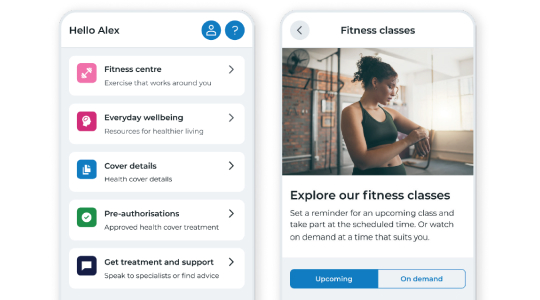
Make wellbeing work for you in Bupa Touch
Use your digital account to look after your mind and body.
Fitness and wellbeing is available to all Bupa UK health insurance and trust members over 16 years old.
- Over 1,500 fitness classes from yoga to HIIT workouts
- Follow exercise plans designed for all levels
- Guided meditations to help with breathing, sitting, walking and stretching
- Access articles and videos filled with proactive wellbeing advice
Your health in your hands

How to cope with anxiety
Health is, sometimes, just getting through the day. We offer free mental health support whether you have Bupa health insurance or not.

Dementia support
Health is finding the safety that dementia had taken away. Whether you have dementia yourself or are looking after a loved one, there are various organisations that you can turn to for support.

Free health assessments with small business health insurance
Take out a new Select health insurance policy and you’ll get a free health assessment for every employee covered up to a maximum of ten. For new customers who purchase directly from Bupa and are not switching from another provider. Offer ends 30 April 2024. T&Cs apply†

† Add more than one child under 20 years old to your policy and you’ll only pay for the eldest child, no matter how many more children you add. Children aged 20 or over cannot receive free cover or count as an ‘eldest child’ for this offer. Cover must include at least two children aged 19 or under. You’ll still receive our 10% family discount if you have free child cover. Children do not have to live at the same address as the main member. This offer applies to our Comprehensive and Treatment and Care policies. We may remove or change these offers when you renew. See full Terms and Conditions (PDF, 0.07MB).
†† Families pay 10% less for a joint policy compared to the price of separate policies for each family member. Cover must include at least one adult and one or more children. Children do not have to live at the same address as the main member. This offer applies to our Bupa By You Comprehensive and Treatment and Care health insurance policies. This offer may change or be unavailable when you renew.
Bupa health insurance is provided by Bupa Insurance Limited. Registered in England and Wales No. 3956433. Bupa Insurance Limited is authorised by the Prudential Regulation Authority and regulated by the Financial Conduct Authority and the Prudential Regulation Authority. Arranged and administered by Bupa Insurance Services Limited, which is authorised and regulated by the Financial Conduct Authority. Registered in England and Wales No. 3829851. Registered office: 1 Angel Court, London, EC2R 7HJ.
